
Factory AI: Where to Start? 5 Use Cases and a Pilot Checklist
Explore 5 manufacturing AI use cases, assess data readiness, plan a focused pilot and choose KPIs to evaluate results before scaling across your factory.

Factories may already hold data in many forms, including machine manuals, quality documents, production reports, ERP records and daily work logs. Having a large volume of data, however, does not tell you which tasks to apply AI to first or how to evaluate the results.
Starting with a broad goal, such as using AI across the entire factory, can force the project team to handle many processes, data sources and stakeholders from the outset. This makes it difficult to identify what creates value and what still needs to be resolved.
A practical starting point is to choose one clearly defined problem with an owner and data that can support evaluation, then run a pilot before deciding whether to scale. This article outlines use cases to consider, a readiness checklist and ways to plan a trial around actual work.
Define the Problem Before Choosing AI
Start with tasks people perform every day, such as searching for manuals, compiling data from several files or repeatedly entering information from documents. Identify who does the work, how long it takes, which errors occur and where their effects are felt.
This information helps clarify what the project needs to change. Some problems may first be addressed by organizing data, connecting systems or improving workflows, with AI taking on a specific role such as reading documents, summarizing text or analyzing images.
For example, if reporting is delayed because departments use inconsistent product codes, adding AI to summarize reports will still require improvements to the source data. Separating the roles of data, systems and AI helps define a more appropriate pilot scope.
5 AI Use Cases Factories Can Assess as a Starting Point
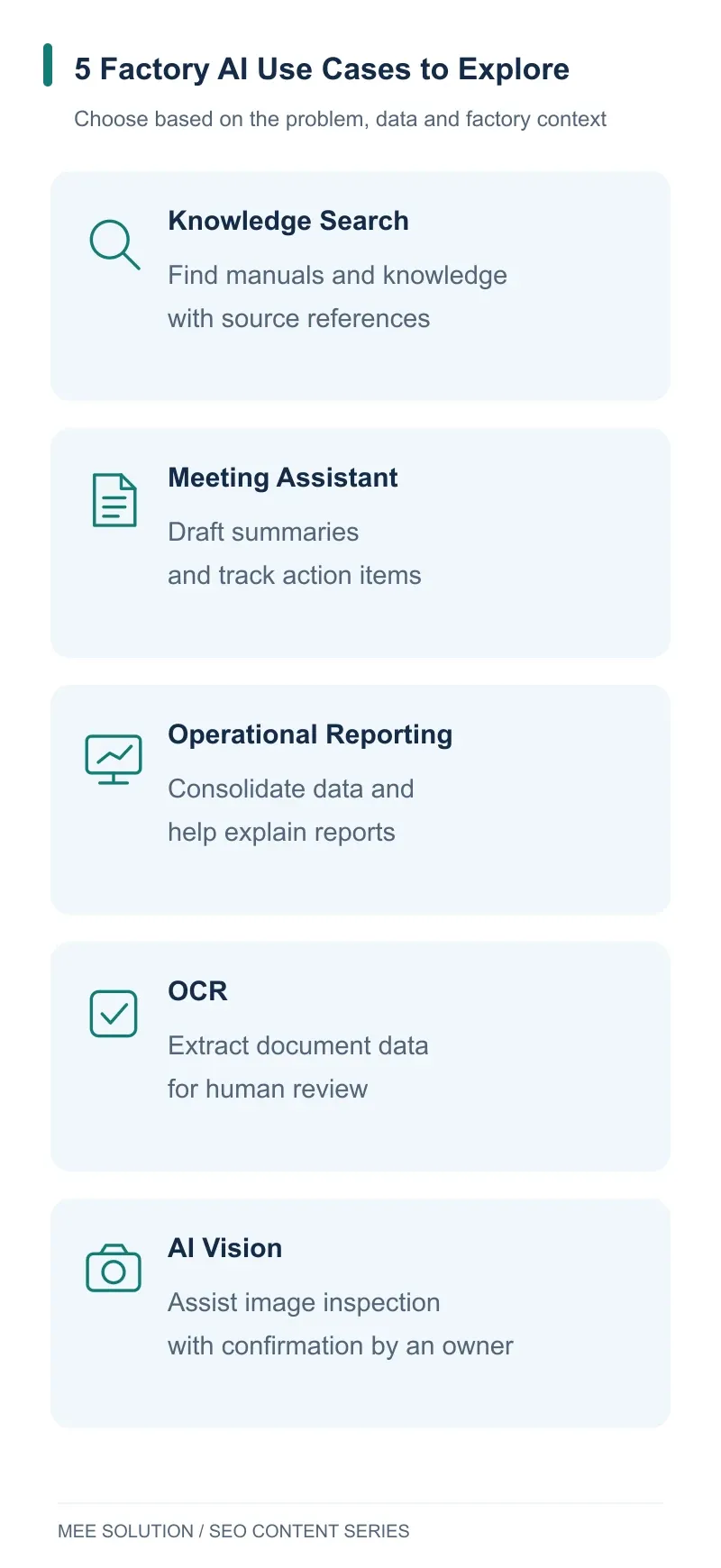
These are examples to assess. The actual scope depends on each factory's data and systems.
The use cases include searching manuals and internal knowledge with source references, drafting meeting summaries and action lists, consolidating data and explaining reports, extracting document data for human review, and assisting image inspection with confirmation by the responsible person.
1. Search Factory Manuals and Internal Knowledge
SOPs, machine manuals and quality specifications may be scattered across folders. Employees may need to know a filename or ask an experienced colleague to find them. A knowledge search assistant can let users ask questions in familiar language and receive answers with source documents they can check.
Before the pilot, select approved, current documents, identify their owners and clearly define user permissions. Even when a system retrieves information to support its answers, accuracy and completeness still need to be tested because answer quality also depends on the data and retrieval process. Microsoft's guidance on RAG
Measure whether users can find the correct documents, how long it takes and whether the system communicates limitations appropriately when information is insufficient. For questions involving important procedures, users should also be able to access the original documents and the responsible person.
2. Assist with Meeting Summaries and Action Tracking
Meetings often produce discussion points, decisions, action owners and deadlines. When these are spread across several sets of notes, the team may spend time consolidating and checking them. AI can be piloted to draft summaries and organize action items for the responsible people to review.
The pilot should specify where the information comes from, who reviews the summary and what counts as an error. Examples include naming the wrong action owner, omitting a deadline or presenting a discussion point as an approved decision.
Evaluate both drafting time and correction time. A faster first draft does not demonstrate practical value if the reviewer must rewrite almost all of it.
3. Consolidate Data and Help Explain Operational Reports
Some factories combine ERP data, report files and maintenance logs to prepare operational reports. A project may begin by connecting the necessary data, making formats consistent and displaying results in a dashboard before considering AI summaries or follow-up questions from users.
Distinguish data integration and calculation from the AI's role. Production figures, for example, should come from verifiable sources and calculation methods, while AI may help turn that dataset into a written explanation.
For a pilot, consider reading data without sending commands back to the source systems. Access permissions, retrieval frequency and effects on existing systems still need to be assessed, even when access is read-only.
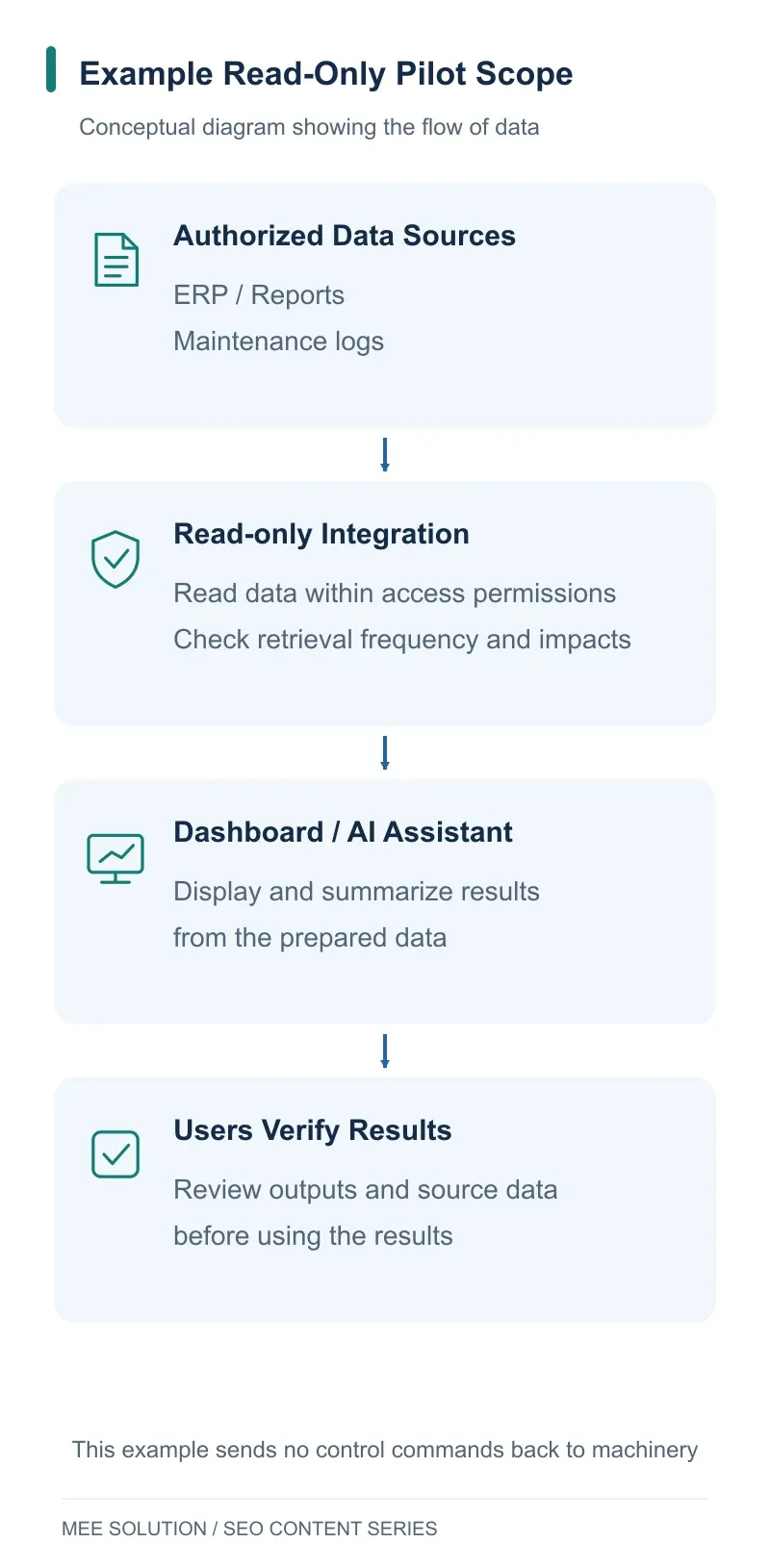
Conceptual diagram: this example does not send control commands back to machinery.
Read authorized data from ERP systems, reports and maintenance logs through a read-only integration into a dashboard or AI assistant for users to check. Permissions, retrieval frequency and effects on existing systems still need review. This scope does not send control commands back to machinery.
4. OCR for Documents That Require Repeated Data Entry
Incoming documents, inspection sheets and forms may contain information that must be entered into another system. OCR and document extraction tools can be piloted to read the required values and send them to users for review before they are recorded downstream.
Test with documents that reflect actual work, including clear and unclear images, different layouts and incomplete information. Check individual fields, such as product codes, dates and quantities, because errors in different fields may have different consequences.
Some extraction tools provide confidence scores to help identify items requiring review. These scores still need to be used alongside actual test results and the conditions of the task. Google Document AI's explanation of confidence scores
5. AI Vision to Assist Image Inspection
Camera images may be assessed for applications such as assisting defect inspection, checking particular conditions or flagging events for a responsible person to investigate. Suitability depends on the task, image quality and available test examples.
Before starting, define precisely what needs to be detected, together with lighting, camera angle, distance and variations between items. If test conditions differ substantially from the factory floor, the results may not be sufficient to support a deployment decision.
Evaluate both false alarms and missed detections, and define who confirms results and what happens next. For safety-related tasks, involve the people responsible for factory operations and control systems in an assessment before connecting AI to actual control actions.
6 Questions to Ask Before Choosing an AI Pilot Use Case
1. Are the Problem's Boundaries and Process Ownership Clear?
Define which process the pilot covers, where it starts and ends, who will use it and who has authority to decide whether the results are usable. A project coordinator alone may not be enough if no process owner is involved in evaluating the results.
2. Do You Have a Baseline for Comparison?
Record how the work is currently done, including measures such as average time per item, the number of tasks requiring corrections or the volume of documents processed. Use definitions and collection methods that allow a meaningful comparison after the pilot.
3. Is the Data Ready, and Are You Authorized to Use It?
Check where the data is stored, who owns it, how complete and current it is, and what each user group is permitted to see. For knowledge search systems, design access controls into the retrieval stage itself. Microsoft's guidance on document-level access control
4. Which Systems Need to Be Connected, and at What Access Level?
Identify the data sources, integration methods and necessary permissions. If the aim is to assess search or summarization quality, you may start with authorized sample data and assess live system integration in a later step.
5. What Data and Infrastructure Requirements Apply?
Gather requirements for data storage, external access, retention periods and approved systems. Use these to assess cloud, on-premises or hybrid options with the organization's responsible teams.
6. Who Will Own and Support the Solution If the Pilot Succeeds?
Identify data owners, people who will handle user requests, the budget and those responsible for evaluating results after deployment. Document changes, workflow revisions or new user groups may require ongoing testing and adjustments.
How to Plan an AI Pilot in 4 Steps
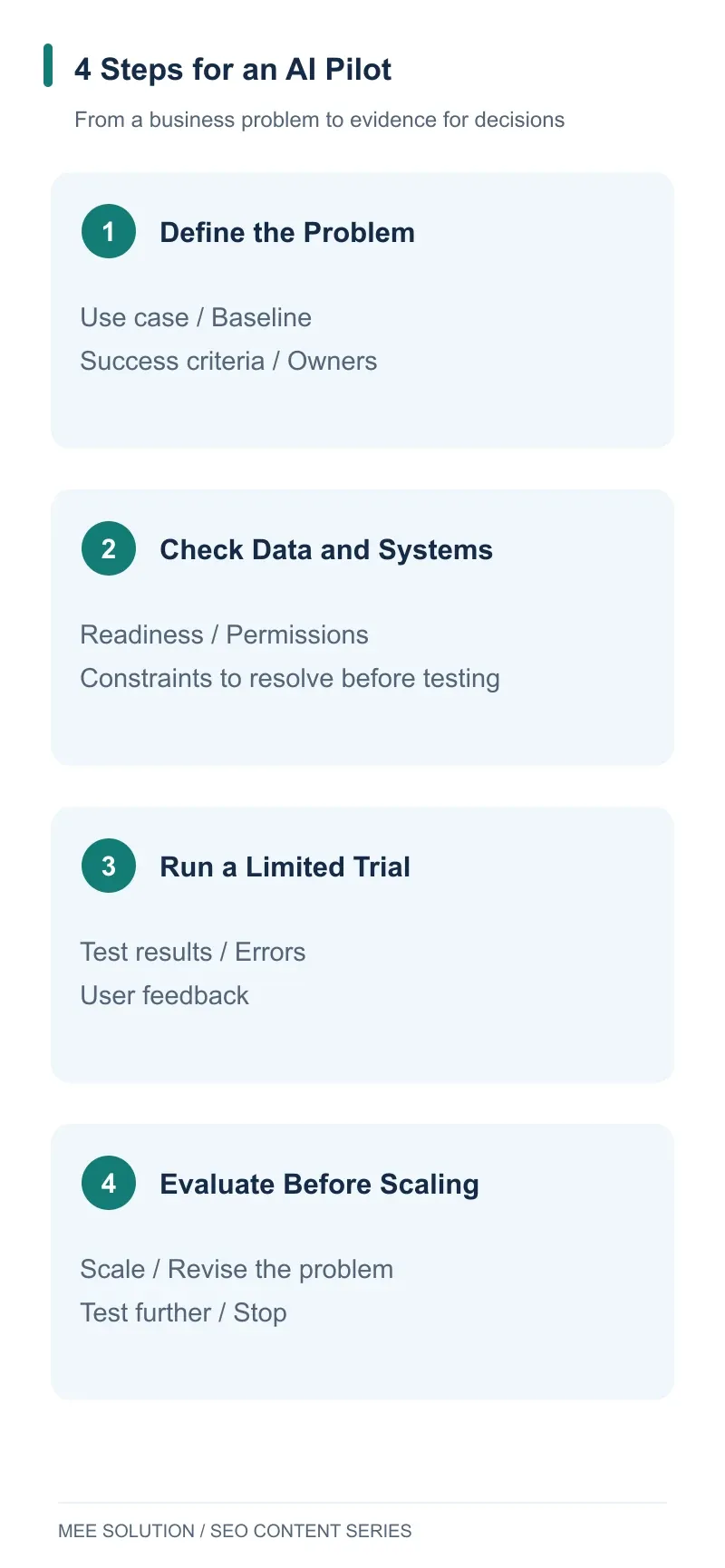
A general delivery framework; timing and scope depend on the project.
Define the use case, baseline, success criteria and owners. Check data, permissions and constraints. Run a limited trial and record the results, then decide whether to scale, revise the problem, test further or stop.
Step 1: Define the Problem and Success Criteria
Choose one use case whose scope fits the available resources. Identify users, data sources, the baseline and deliverables. Agree in advance which results would justify considering wider deployment and which would require further work.
Success criteria should cover both quality and practical use. For example, answers should be correct on the test set, users should be able to complete their work and the review effort should be acceptable to the responsible team.
Step 2: Check the Data and System Constraints
Use sample data to identify issues that may affect results, such as duplicate documents, inconsistent versions, missing information or varying image formats. Check access and integration conditions before using real operational data.
This step should establish what is ready, what needs further preparation and which issues affect scope or timing, so decisions can be made before detailed development begins.
Step 3: Run a Limited Trial
Clearly define the user group and dataset, and collect results for both successful and failed cases. If the system needs adjustment during the trial, record what changed and which data was used to evaluate it.
Keep an evaluation dataset separate from the data used to adjust the system. This helps show how well it handles new cases. Also collect user observations about steps that remain difficult.
Step 4: Evaluate Before Deciding Whether to Scale
Compare results with the baseline, including time spent on review, corrections and system support. Then assess how closely the pilot's data and conditions match those of a wider deployment.
The decision may be to scale, revise the problem, test further or stop that use case. Finding that data is not ready or that benefits do not justify the additional workload also provides useful information for future project planning.
How Should You Choose KPIs and Evaluate Value?
KPIs should relate to the work users need to complete. A document search system, for example, should be evaluated on finding the correct document or answer and the time taken. OCR should be assessed on important field accuracy and review effort.
Example KPIs for Evaluating an AI Pilot
Use case: Knowledge search
- Measures to consider: Search time, accuracy and source references
- How to establish a baseline: Ask users to answer a set of questions using the existing method
- People involved in evaluation: Document owners and users
Use case: Meeting summaries
- Measures to consider: Drafting and correction time, and important points omitted
- How to establish a baseline: Time the existing summarization and review process
- People involved in evaluation: Meeting participants and approvers
Use case: Operational reporting
- Measures to consider: Data compilation time, completeness and freshness
- How to establish a baseline: Record the steps and time needed to produce current reports
- People involved in evaluation: Report owners and data owners
Use case: OCR
- Measures to consider: Field-level accuracy and correction time
- How to establish a baseline: Use sample documents with verified reference answers
- People involved in evaluation: The people responsible for the documents
Use case: AI Vision
- Measures to consider: False alarms, missed detections and confirmation effort
- How to establish a baseline: Use images or events with reference inspection results
- People involved in evaluation: Factory-floor specialists and QA
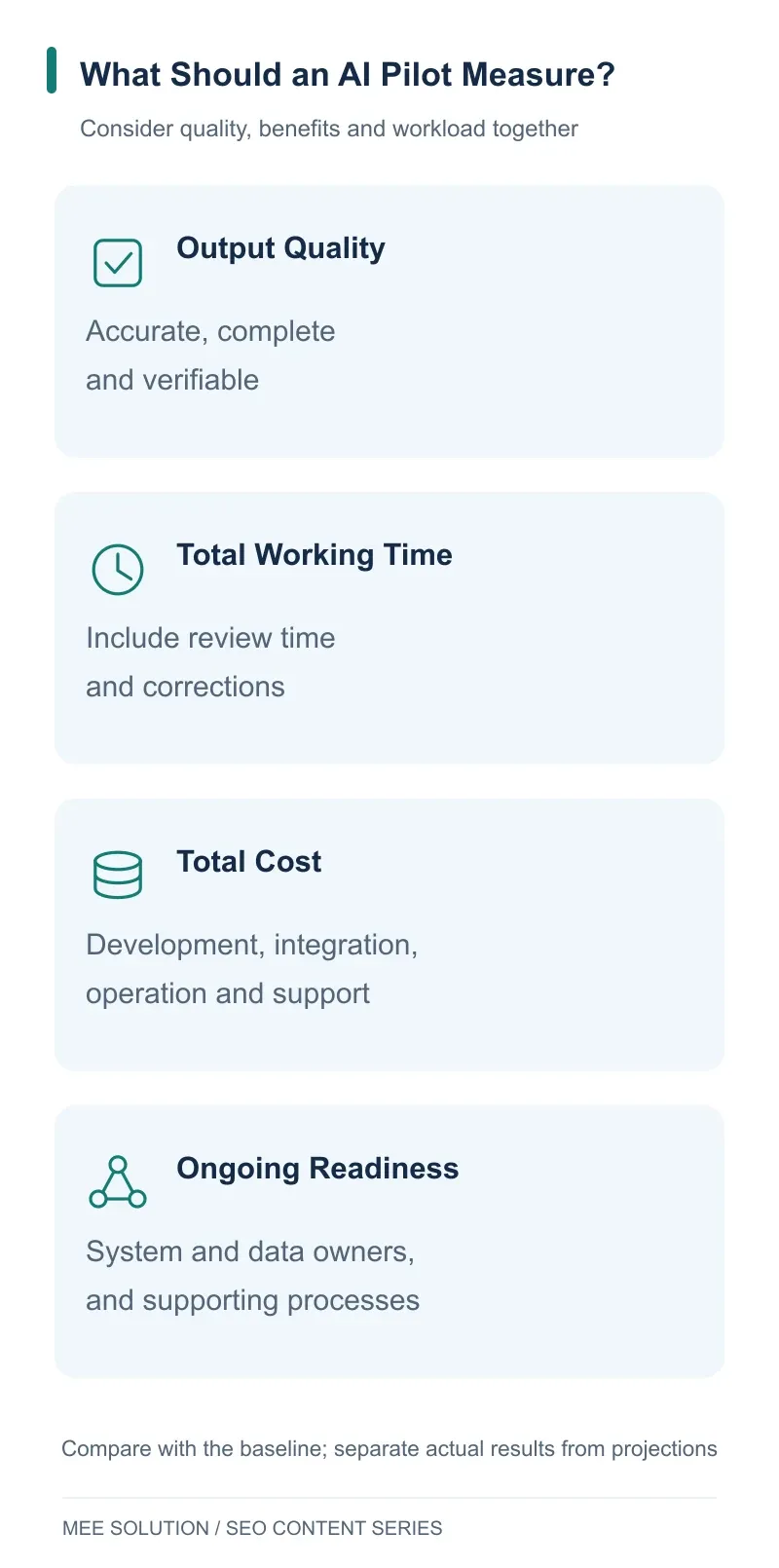
Compare with the baseline and distinguish measured results from projections.
Evaluate output quality, total working time including checks and corrections, development and support costs, and readiness for continued operation. Compare with the baseline and distinguish actual results from projections.
To evaluate value, weigh measured benefits against development, integration, infrastructure, licensing, training and support costs. Include the additional time required from data reviewers and system owners after deployment.
Report reductions in time as time saved first. Translating that into financial savings depends on how the organization uses the released capacity or resources. If actual spending has not changed, distinguish potential savings from costs already reduced.
Results from a small pilot dataset and user group also need further assessment before scaling. Adding data sources, sites or users may introduce costs and requirements that were not part of the original trial.
How Does MeeSolution's AI BOX Approach Relate to These Use Cases?
MeeSolution designs and develops AI solutions around an organization's problems and data, from automation to using information to support decisions. Discussions can begin with factory-floor problems and the use cases you want to assess. Explore AI Solutions services
Organizations considering AI BOX should first review the intended tasks, source data, systems to integrate and deployment requirements with the team. Confirm which capabilities are supported within the proposed scope and which require additional design or development.
The use cases in this article are starting points for exploring needs, not a confirmed feature list included in every product or proposal. Actual implementation should be based on the scope agreed by both parties.
Frequently Asked Questions
Can We Start Assessing AI Without a Data Platform?
You can start with a use case that relies on a limited number of data sources, such as documents prepared for a trial. Data quality, permissions and currency still need to be checked. Use cases spanning several systems may require additional data preparation and integration.
Must the Pilot Connect Directly to Machinery?
That depends on what the pilot needs to demonstrate. Some document search or report summarization tasks can begin with authorized data without connecting to machinery. Use cases involving operational technology (OT) data require an assessment of architecture, access and impacts with the responsible system owners.
How Should We Choose Between Cloud and On-Premises Deployment?
Consider data requirements, connectivity, performance, costs and the team's ability to operate the solution together. A deployment label alone is not enough to establish suitability; assess the actual architecture and controls being designed.
How Do We Know Whether a Pilot Is Ready to Scale?
It should meet the agreed criteria for quality, user workflows, data and ongoing support. Assess the additional requirements of scaling, such as user numbers, data sources and support after deployment. If significant errors remain, define a remediation and testing plan before expanding.
Start Factory AI with a Clear Problem and Verifiable Results
An industrial AI initiative should start with an identifiable problem, usable data, responsible owners and an agreed way to measure results. A suitably scoped pilot helps the team learn from actual use and provides evidence for deciding what to develop next.
If your factory needs to search documents, consolidate reports, reduce repeated data entry or assess another potential AI application, prepare your workflows, sample data and system constraints, then discuss the use case with MeeSolution AI Solutions